When learning how new PHP frameworks do things, I try to scaffold a minimal app or website with them – Slim, Leafs, Laminas, Mezzio just to name a few. And while I don’t even know yet whether I’ll need an ORM, or whether it makes sense to add one, I quickly reach the point where I want to store some entities somewhere: a user’s email and password, a tree-like navigation structure for a website, a page builder, or configurations and settings for an app or parts of the app.
In the past, I threw MySQL/Postgres at the problem. That felt wrong. This was the motivation to create DOM-ORM: it allows me to work with entities – persist(), repositories, typed objects – without installing a database driver or a full-featured ORM, let alone configuring a database server, users, roles and a SQL client. Making use of what PHP already provides.
In this article I’ll build a minimal blog on top of it, then walk through the features that make it more than a “just an XML file” experiment: relationships, a query cache, concurrency, field-level encryption, schema evolution, built-in git versioning and headless exports. I’ll also explain why the API feels so familiar if you’ve used Doctrine – and why I didn’t build it as a Doctrine driver.
What you need (and you probably already have)
The library relies on ext-dom (which includes DOMXPath – no extra activation needed), ext-xml, ext-libxml, ext-json and ext-mbstring. #[Sensitive] encryption additionally uses OpenSSL, and the versioning feature just needs the git or hg binary on your PATH. On a standard PHP install – LAMP server, distro packages, shared hosting – all of these are enabled by default, so everything works out of the box.
The use case: a minimal blog
Let’s build a small blog with three entities: Article, Comment and Tag. Articles have comments (one-to-many) and tags (many-to-many). That’s enough to cover most of what the library offers.
Step 1: Install
composer require vardumper/dom-ormThat’s it. No database to install, no DSN to configure.
Step 2: Configure
By default, DOM-ORM stores the XML file on the local filesystem at storage/data.xml. To make that explicit (and to enable other options later), I create a config file:
config/dom-orm.php<?php return [
  'dom-orm' => [
    'flysystem' => [
      'adapter' => League\Flysystem\Local\LocalFilesystemAdapter::class,
      'config' => [__DIR__ . '/storage'],
    ],
    'filename' => 'data.xml',
  ],
];
Storage is also pluggable via Flysystem, so S3, Azure Blob, Google Cloud or (S)FTP all work. Be aware that the built-in locking only works with the local adapter – more on that below.
There’s also a built-in in-memory adapter if you want the XML to live only in process memory. It never writes to disk – it’s a scratchpad for a unit of work: you load the XML from your own durable store (e.g. a database column), run your persist() calls in-process, then flush the final XML back yourself and call reset() to free the memory.
config/dom-orm.php<?php return [
  'dom-orm' => [
    'flysystem' => [
      'adapter' => DOM\ORM\Storage\InMemoryFilesystemAdapter::class,
      'config' => ['location' => 'pagebuilder-runtime'],
    ],
    'filename' => 'data.xml',
  ],
];
This config file is optional, the library checks for environment variables like DOM_ORM_FILENAME, DOM_ORM_FLYSYSTEM_LOCATION, DOM_ORM_VERSIONING, …
When both a config file and environment variables are present, the environment variables win.
Step 3: Define the entities
In an ORM, entities are plain PHP objects that map to storage. And when querying data, they map back from storage to the entity object. In DOM-ORM, an entity becomes an <item />, each property becomes a <fragment />, and properties that are array collections of entities become <group />s. You describe that with PHP 8 attributes:
src/Entity/Article.phpuse DOM\ORM\Entity\AbstractEntity;
use DOM\ORM\Mapping as ORM;

#[ORM\Item(entityType: 'article')]
class Article extends AbstractEntity
{
    public function __construct(
        #[ORM\Fragment]
        private string $title,
        #[ORM\Fragment]
        private string $body = ''
    ) {
        parent::__construct();
    }
}
$id and $createdAt are handled by the library: on persist, DOM-ORM generates a 32 character UUID and a timestamp automatically. You don’t have to set them yourself.
src/Entity/Comment.phpuse DOM\ORM\Entity\AbstractEntity;
use DOM\ORM\Mapping as ORM;

#[ORM\Item(entityType: 'comment')]
class Comment extends AbstractEntity
{
    public function __construct(
        #[ORM\Fragment]
        private string $body
    ) {
        parent::__construct();
    }
}
Step 4: Persist
Persistence happens through EntityManagerTrait – mix it into a service or controller and call persist():
src/Service/BlogService.phpuse DOM\ORM\Repository\EntityRepository;
use DOM\ORM\Traits\EntityManagerTrait;

class BlogService
{
    use EntityManagerTrait;

    public function addArticle(string $title, string $body): void
    {
        $this->persist(new Article($title, $body));
    }

    public function updateArticle(string $id, string $title): void
    {
        $article = (new EntityRepository(Article::class))->find($id);
        $article->setTitle($title);
        $this->persist($article); // persist() saves new AND updates existing
    }

    public function removeArticle(string $id): void
    {
        (new EntityRepository(Article::class))->remove($id);
    }
}
That’s the whole write API: persist() for create and update, remove() for delete. No save() vs. merge() vs. detach() to keep straight.
After a few persist() calls, storage/data.xml looks like this:
storage/data.xml<data>
  <item type="article" id="e34cbf80edaf490aa39113254b6cdfa9">
    <fragment name="title"><![CDATA[Hello World]]></fragment>
    <fragment name="body"><![CDATA[First post on DOM-ORM.]]></fragment>
    <fragment name="createdAt"><![CDATA[2026-06-17T06:30:37+00:00]]></fragment>
  </item>
  <item type="article" id="1c9a2b7f6e5d4c3b8a7f6e5d4c3b2a10">
    <fragment name="title"><![CDATA[Another article]]></fragment>
    <fragment name="body"><![CDATA[Lorem ipsum dolor sit amet.]]></fragment>
    <fragment name="createdAt"><![CDATA[2026-06-17T07:12:05+00:00]]></fragment>
  </item>
</data>
Step 5: Query
Reading is done through EntityRepository – same method names you know from Doctrine:
src/ControllerOrService/Example.php$repo = new EntityRepository(Article::class);

$article  = $repo->find('e34cbf80edaf490aa39113254b6cdfa9');    // one by ID
$article  = $repo->findOneBy(['title' => 'Hello World']);       // one by criteria
$articles = $repo->findAll();                                   // all
$articles = $repo->findBy(['title' => 'Hello World']);          // collection
findBy() accepts Doctrine-style $orderBy, $limit and $offset arguments.
Under the hood, queries are XPath, and the results are mapped back to typed entity objects. If you prefer to work with the XML directly, you can – DOMXPath and DOMDocument are just the PHP standard library:
src/ControllerOrService/Example.php$xml = DOM\ORM\Storage\StorageService::fromConfig()->read();
$dom = new DOMDocument();
$dom->loadXML($xml);
$xpath = new DOMXPath($dom);
$articles = $xpath->query('//item[@type="article"]');
The difference is performance. The ORM’s find*() methods make use of a clever caching mechanism, XPath queries don’t.
Relationships
Because XML is a tree structure, you get relationships by design – simply by looking at where in the tree something is stored.
One-to-many: comments on an article
Declare the collection with #[Group]:
src/Entity/Article.php#[ORM\Item(entityType: 'article')]
class Article extends AbstractEntity
{
    public function __construct(
        #[ORM\Fragment]
        private string $title,
        #[ORM\Group(entity: Comment::class, groupType: 'comments')]
        private array $comments = [],
    ) {
        parent::__construct();
    }
}
The comments now nest inside the article in the XML:
storage/data.xml<item type="article" id="post-1">
  <fragment name="title"><![CDATA[My first post]]></fragment>
  <group type="comments">
    <item type="comment" id="comment-1">
      <fragment name="body"><![CDATA[Great post]]></fragment>
    </item>
    <item type="comment" id="comment-2">
      <fragment name="body"><![CDATA[Thanks for sharing]]></fragment>
    </item>
  </group>
</item>
And on the PHP side, $article->getComments() returns an array of Comment entities.
Many-to-many: tags
For many-to-many, use a join entity – the same trick you’d use in a relational database:
src/Entity/TagLink.php#[ORM\Item(entityType: 'tag_link')]
class TagLink extends AbstractEntity
{
    public function __construct(
        #[ORM\Fragment]
        private string $articleId,
        #[ORM\Fragment]
        private string $tagId,
    ) {
        parent::__construct();
    }
}
$links = (new EntityRepository(TagLink::class))->findBy(['articleId' => 'post-1']);Scoping: simulating table structure
By default, entities are appended to the root <data> element. If you want to constrain where an entity may live, #[Item] accepts allowedParentPaths with XPath expressions – this lets you simulate the table-scoping behaviour of a relational database:
src/Entity/Article.php#[ORM\Item(entityType: 'article', allowedParentPaths: ['//group[@type="articles"]'])]
class Article extends AbstractEntity { ... }
When exactly one path is given, persist() places the entity there automatically. When several paths are allowed, you pass the target node explicitly:
$this->persist(new Comment('Great post!'), $articleNode);Performance
I benchmarked DOM-ORM against Doctrine ORM on SQLite, MariaDB and PostgreSQL — the apples-to-apples comparison, the same ORM on every side — with identical rows at 5K, 10K and 50K records. The honest answer depends on which request you’re measuring, so the full report keeps three models separate:
- Cold — a fresh PHP process with opcache off. The pessimistic floor.
- Opcache-warm — a fresh process per request, but opcache holds the compiled cache files in shared memory, the way php-fpm workers do. The first request after a deploy or a cache rebuild pays the compile cost once; every later request is warm. This is what a real deployment pays.
- Warm in-process — the query cache already loaded in one long-lived process (CLI tools, workers).
Activate the pre-compiled cache:
config/dom-orm.php<?php return [
    'dom-orm' => [
        // … existing config …
        'cache_path'     => __DIR__ . '/storage/cache.php',
        'cache_strategy' => 'manual',   // or 'on_persist'
    ],
];
./vendor/bin/dom-orm build-cacheOnce the cache exists, find(), findAll(), findBy() and findOneBy() read from it by design. The cache records a SHA-256 fingerprint of the data file it was built from, so if the XML should change externally (a cron job, a manual edit, a git restore), it’s rebuilt on the next read. No stale data, no manual invalidation.
The honest downsides: a large XML file means more memory consumption, and writes rewrite the whole document. For batch work there’s persistBatch($entities), which writes to the file only once instead of once per entity.
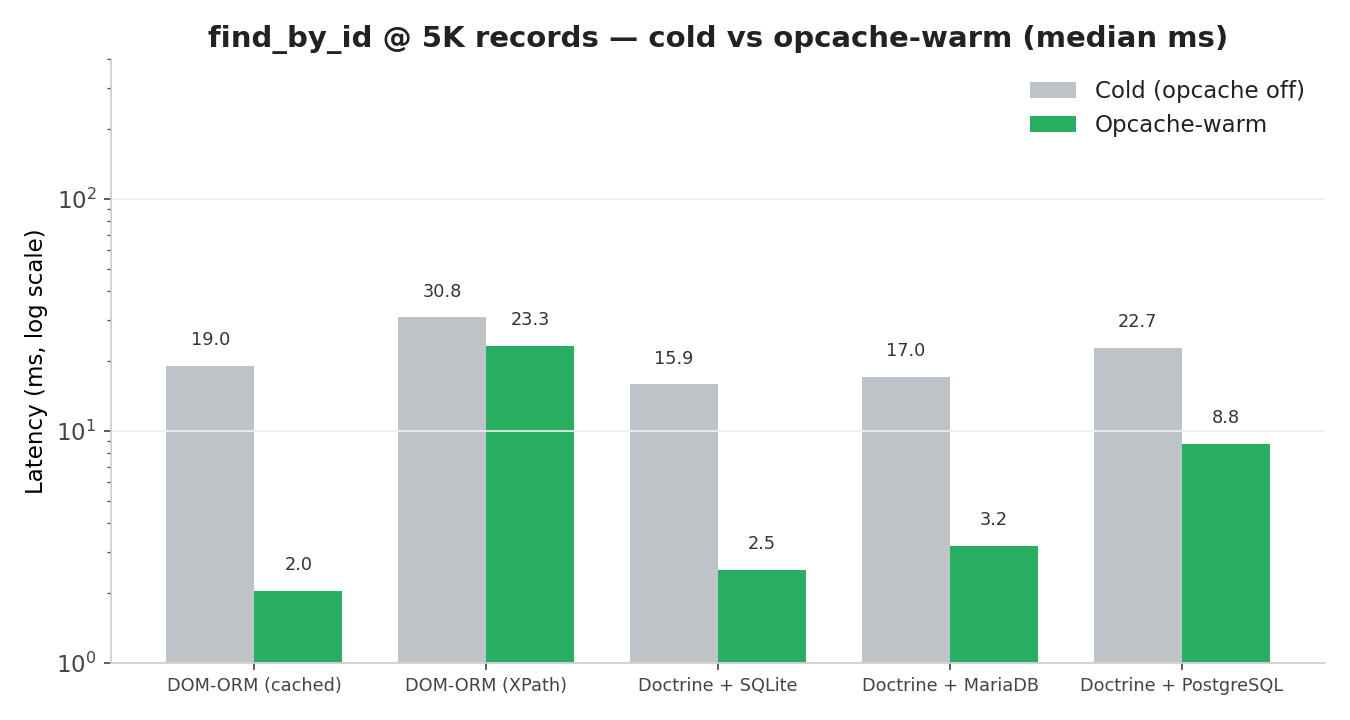
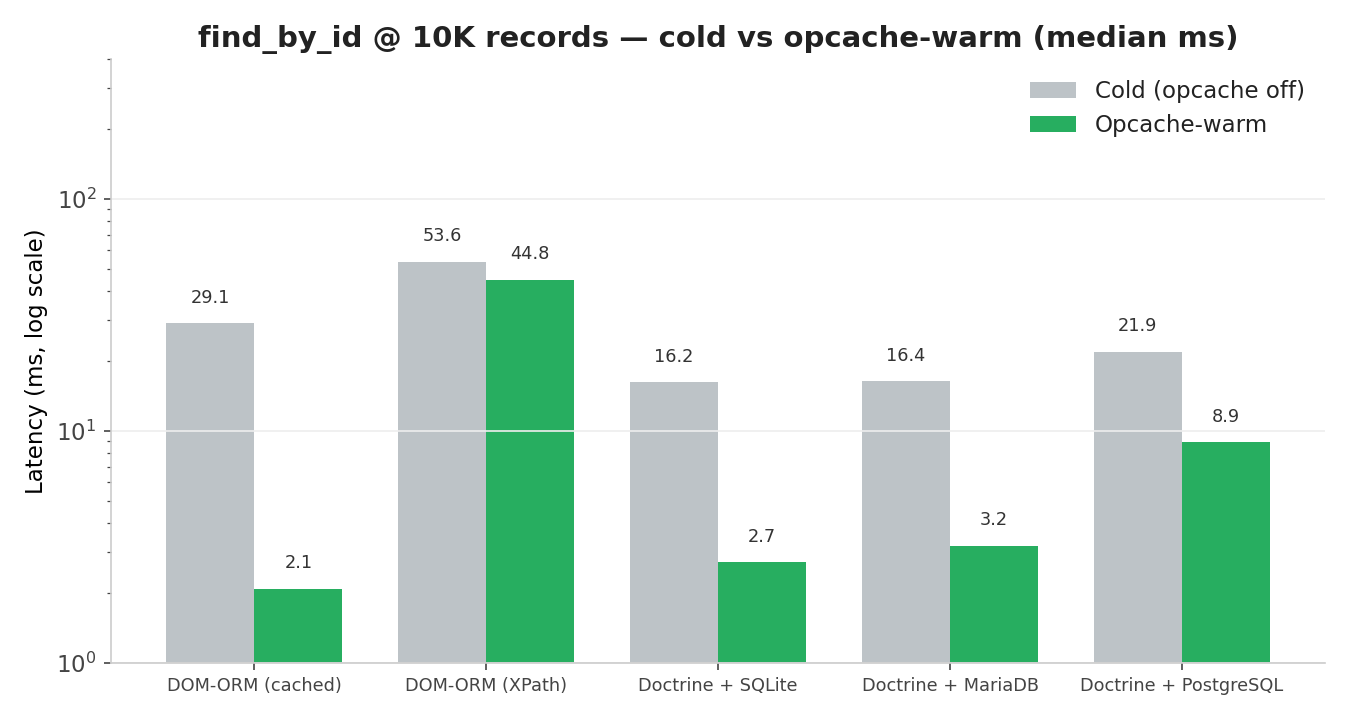
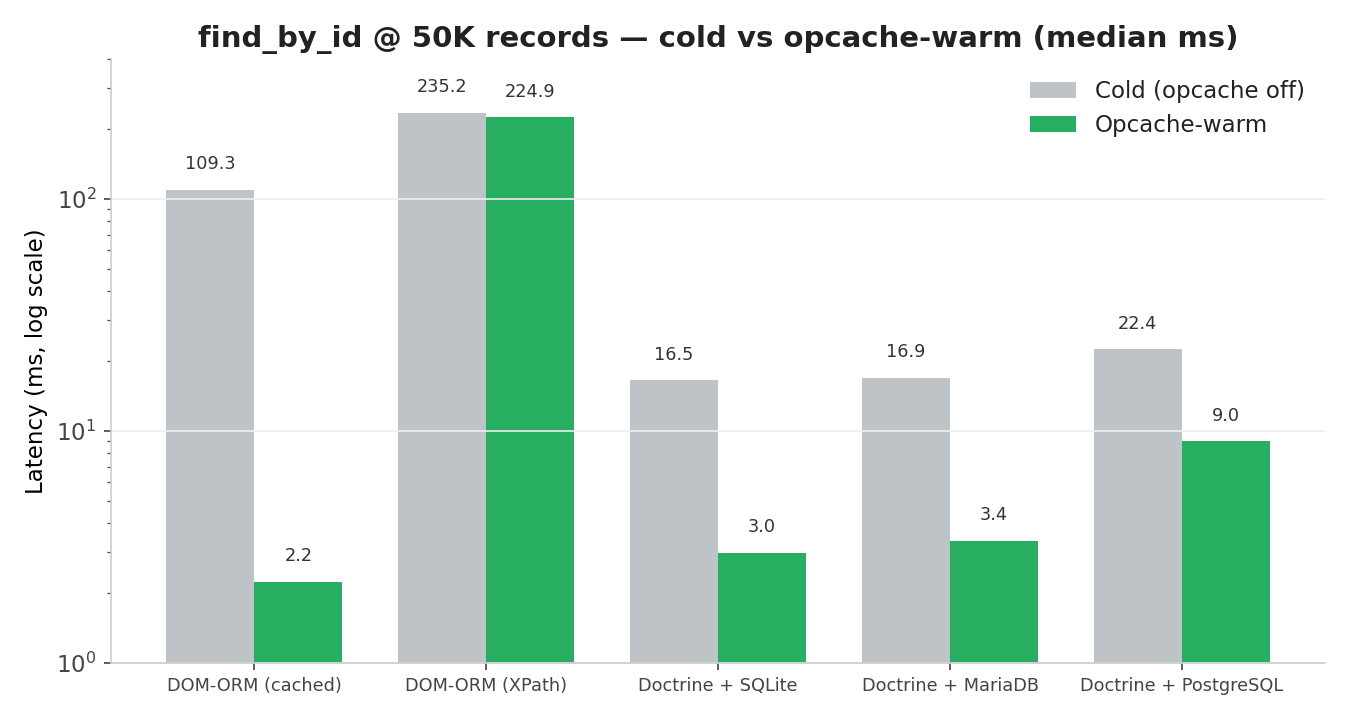
With OPcache enabled via PHP-FPM or Apache, DOM-ORM point lookups are flat (~2 ms) and outperform traditional databases, though cold requests scale linearly with dataset size. Because OPcache shares compiled opcodes across processes via fork(), web servers and long-lived daemons get this performance out of the box, which can be optimized further using opcache.file_cache, the dom-orm warm-cache command, and adequate Docker shared memory (--shm-size=1g). Within a single persistent process, lookups drop to microseconds, though fresh web requests always incur a standard ~2 ms bootstrap cost.
However, DOM-ORM has notable limitations: findAll() is a weak spot (~487 ms at 50K records) because the payload array is rebuilt per request, and memory consumption grows linearly at roughly 7 KB per record. Conversely, writes shine when using persistBatch(), which outperforms database alternatives by 3–5x by rewriting the document once per batch rather than per entity. Ultimately, DOM-ORM excels for lookup-heavy, single-host applications under ~50K records using OPcache, while bulk reads, high concurrency, transactions, or larger datasets still require a traditional database.
So up to 10K entries, performance is competitive and in some areas faster than existing Doctrine adapters. Implementation and environment configuration are key.
Concurrency
DOM-ORM uses a read-modify-write workflow: it loads the XML file into memory, changes the DOM, and writes the whole document back. Without coordination, concurrent writers would overwrite each other.
With the default local adapter, this is handled automatically: a blocking flock() lock file sits next to the XML store (storage/data.xml.lock) and is held across the full read-modify-write cycle. Concurrent PHP processes queue behind the active writer instead of corrupting the file or silently dropping updates.
For remote adapters (S3, Azure, GCS, SFTP), there’s no distributed lock – PHP’s flock() only works on local filesystems. Remote storage remains vulnerable to last-write-wins races unless you add your own coordination (a single write worker, a Redis lock, …). Personally I’d treat remote adapters as read-mostly snapshots and keep writes on a single local authority.
Sensitive data
If you store personal data in a file, you don’t want anybody with access to the file being able to just read that sensitive information. So, encryption at rest matters. Mark any #[Fragment] with #[Sensitive] and its value is stored as AES-256-GCM ciphertext:
src/Entity/User.php#[ORM\Item(entityType: 'user')]
class User extends AbstractEntity
{
    public function __construct(
        #[ORM\Fragment]
        private string $username,
        #[ORM\Fragment]
        #[ORM\Sensitive]                 // encrypted on persist
        private string $email,
    ) {
        parent::__construct();
    }
}
A deterministic HMAC-SHA256 searchable-hash is stored alongside the ciphertext, so you can still query the field without decrypting the whole file:
$user = (new EntityRepository(User::class))->findOneBy(['email' => 'alice@example.com']);
echo $user->getEmail(); // decrypted plaintext
This requires an encryption_key in the config. If the key is absent, #[Sensitive] is silently ignored and the field is stored in plain text – no error is thrown. You need to make sure the key is actually set in every environment.
Schema evolution
Renaming or removing a property from an entity would normally leave old fragments in the file. DOM-ORM handles this without silent data loss: unknown fragments are simply skipped during hydration, and cleanup is explicit via CLI.
Describe what changed with #[FragmentMap]:
#[ORM\Item(entityType: 'user')]
#[ORM\FragmentMap([
    'fullName'    => 'name',   // renamed: old XML key → new property
    'legacyEmail' => null,     // removed: pruned by cleanup
])]
class User extends AbstractEntity { ... }
Old XML items keep working immediately – the map is applied at read time, so fullName is hydrated into name without any migration step. When you’re ready to rewrite the file:
./vendor/bin/dom-orm migrate --dry-run   # preview first
./vendor/bin/dom-orm migrate
./vendor/bin/dom-orm cleanup --dry-run
./vendor/bin/dom-orm cleanup
Tip: add migrate && cleanup && build-cache to your deployment script to keep the XML clean and reads fast after every schema change.
Built-in versioning
DOM-ORM can commit the XML data file to a Git or Mercurial repository after every write or you do it at your own rhythm with a cron job. A full audit trail and an off-site backup without any extra infrastructure.
config/dom-orm.php<?php return [
  'dom-orm' => [
    'versioning' => true,
    'version_control' => 'git', // or hg
    'version_control_push' => 'manual',
  ],
];
After each write, DOM-ORM stages the storage directory and creates a commit whose message names the calling class and method. Push is opt-in: manual commits locally and lets a cron job push on your schedule; on_persist commits and pushes on every write – convenient for low-traffic projects, but it blocks on a network call.
*/15 * * * * cd /var/www/my-project/storage && git push >> /var/log/dom-orm-push.log 2>&1VCS failures are non-fatal: you get a PHP warning and the application continues. The XML write that already succeeded is never rolled back.
Headless exports
For headless frontends, the plaintext data.xml is already a pre-compiled data file – but you can also export it into friendlier formats:
./vendor/bin/dom-orm export --json --yamlFields you don’t want in any export get #[Exclude] – they’re still persisted to the XML, just stripped from every output format. Handy for internal fields like a ranking score that shouldn’t leak into an API.
Where it shines – and where it doesn’t
Where it shines:
- Small, single-host datasets (settings, content, state)
- Zero-setup simplicity (no database server or SQL client)
- Human-readable, diffable, and easily backed-up files
- Familiar Doctrine-like DX (
entities,repositories,persist()) - Effortless JSON/YAML exports for headless frontends
Where it fails:
- High-traffic, production-critical workloads needing a traditional DB
- Large datasets (the full file loads into memory)
- Multi-host write concurrency (lacks distributed locking)
- Complex SQL features (joins, relational queries, rollbacks)
A note on Doctrine
If the API above felt familiar, that’s intentional. DOM-ORM was inspired by the ergonomics of Doctrine ORM (and, to a lesser degree, Eloquent):
- Entities with mapping metadata – PHP attributes describe how the object is stored, just like Doctrine’s
#[ORM\Entity]and#[ORM\Column]. - An entity manager with
persist()– one method for create and update. - Repositories –
find(),findAll(),findBy(),findOneBy(),remove()– the same method names as Doctrine’sEntityRepository, so the muscle memory carries over (including theorderBy/limit/offsetarguments onfindBy()). - Collections – typed collections of entities, built on
ramsey/collection. - A unit-of-work-ish cycle – a coordinated read-modify-write instead of ad-hoc file handling.
The difference is what’s on the other side: Doctrine talks SQL to a database server, DOM-ORM talks XML to a file.
Why not a Doctrine driver?
- SQL vs. XML Mismatch: DBAL expects flat rows and SQL, whereas DOM-ORM handles a tree-oriented data model using XPath.
- Different Write Cycles: Doctrine assumes per-row SQL updates over a live connection, while DOM-ORM performs a read-modify-write cycle on the entire document.
- Irrelevant Features: Database concepts like sequences, advisory locks, and
ALTER TABLEdon’t apply to a flat file. - Heavy Footprint: A driver would drag in the massive Doctrine stack, defeating the goal of a lightweight library.
Ultimately, DOM-ORM is a standalone persistence layer that borrows Doctrine’s comfortable vocabulary without the heavy machinery.
Conclusion
DOM-ORM gives you the ergonomics of an ORM – entities, repositories, persist() – on top of a single plaintext XML file. For small datasets on a single host, it’s a genuinely nice middle ground between “ad-hoc JSON file handling” and “install a database server”. The built-in query cache makes reads fast, flock() keeps concurrent writers safe, #[Sensitive] covers encryption at rest, #[FragmentMap] covers schema evolution, and the git versioning gives you an audit trail for free.
Give the demos a spin (a minimal blog and a virtual filesystem, both reset automatically), and check the documentation for the full API.
And yes – I know SQLite exists. Sometimes I use it too. But when I want to open my data in a text editor and diff it in git without a binary format, this is what I reach for.